Photo Editor - Collage Maker
Continue to app
Free Version
Publisher Description


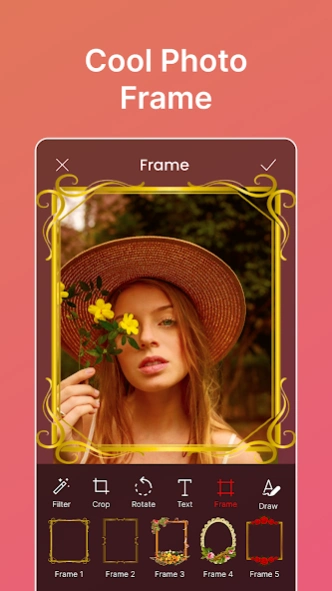

Edit your photos in smart pic collage maker , photo editor layout app
Photo Grid Collage Maker - Turn your photos into unique collages in magic moments!Give your photos a unique transformation into unforgettable memories. Make awesome photo collages by joining your favorite photos with the Photo Grid Collage Maker. This robust Picture Frames: Photo Collage can help you stitch your pictures together and play with the layouts. Pic Collage Maker & Photo Frames allows you to add funny frames and filters to make your photos look more brilliant.
This Pic Stitch: Filters For Pictures tool will surely fill in everything you need to create gorgeous photo collages and picture frames.
🖼️
Key Features of Photo Grid Collage Maker:
🖼️
📸Photo Grid Collage Maker provides an easy means of joining several photos into one beautiful collage;
📸Have fun with the different layouts and filters with Pic Collage Maker & Photo Frames to come out with unique designs;
📸Add filters and effects with Pic Stitch: Filters For Pictures to bring out the best in your photos;
📸Create personalized collages using Picture Frames: Photo Collage to show off your memories;
📸Enhance and combine photos using the powerful editing features in Picture Editor: Combine Photos;
📸With an intuitive Photo Editor: Collage Creator, create breathtakingly beautiful collages in just a few minutes.
Create Amazing Photo Collages with Ease!
With Photo Grid Collage Maker, turning your pictures into art could not be simpler. In addition, Picture Frames: Photo Collage houses massive layouts; thus, selecting the perfect arrangement of images for your pictures becomes quite simple. Whether it be framing your best moments or adding filters, Pic Collage Maker & Photo Frames covers you.
Add Stunning Filters and Frames With Photo Editor: Collage Creator:
📸
Spice up your pictures with various filters and effects within Pic Stitch: Filters For Pictures. The Picture Frames: Photo Collage Maker app is so versatile you can create collages how you like. Add different filters to the picture to improve color and brightness, among others, and try out the vast library of picture frames that Picture Frames: Photo Collage offers.
Edit and Merge Photos with Advanced Tools:
🎨
Picture Editor: Combine Photos works out in advanced editing to make your collages look polished and professional. You can adjust brightness, contrast, and color levels and crop and rotate photos for perfect composition. Editing with Photo Editor: Collage Creator is simple and intuitive, so you can easily combine and enhance your photos in just a few taps.
Unleash Your Creativity with Photo Grid Collage Maker!
Unleash your imagination with Photo Grid Collage Maker, and let the magic begin! From simple designs to complex photo layouts, this Picture Editor: Combine Photos app will help you combine your snaps in the most artistic way ever. Whether combining memories or adding filters to your pictures to make them pop, Pic Collage Maker & Photo Frames and Pic Stitch: Filters For Pictures provide the flexibility and features needed to take your visual stories to the next level.
About Photo Editor - Collage Maker
Photo Editor - Collage Maker is a free app for Android published in the Recreation list of apps, part of Home & Hobby.
The company that develops Photo Editor - Collage Maker is Firehawk. The latest version released by its developer is 1.0 .
To install Photo Editor - Collage Maker on your Android device, just click the green Continue To App button above to start the installation process. The app is listed on our website since 2025-10-30 and was downloaded 4 times. We have already checked if the download link is safe, however for your own protection we recommend that you scan the downloaded app with your antivirus. Your antivirus may detect the Photo Editor - Collage Maker as malware as malware if the download link to com.app.photo.collage.maker.picture.editor is broken.
The company that develops Photo Editor - Collage Maker is Firehawk. The latest version released by its developer is 1.0 .
To install Photo Editor - Collage Maker on your Android device, just click the green Continue To App button above to start the installation process. The app is listed on our website since 2025-10-30 and was downloaded 4 times. We have already checked if the download link is safe, however for your own protection we recommend that you scan the downloaded app with your antivirus. Your antivirus may detect the Photo Editor - Collage Maker as malware as malware if the download link to com.app.photo.collage.maker.picture.editor is broken.
How to install Photo Editor - Collage Maker on your Android device:
- Click on the Continue To App button on our website. This will redirect you to Google Play.
- Once the Photo Editor - Collage Maker is shown in the Google Play listing of your Android device, you can start its download and installation. Tap on the Install button located below the search bar and to the right of the app icon.
- A pop-up window with the permissions required by Photo Editor - Collage Maker will be shown. Click on Accept to continue the process.
- Photo Editor - Collage Maker will be downloaded onto your device, displaying a progress. Once the download completes, the installation will start and you'll get a notification after the installation is finished.
Program Details
System requirements
Operating systems
Android
Download information
File size
N/A
Total downloads
4
Pricing
License model
Free
Price
Version History
Here you can find the changelog of Photo Editor - Collage Maker since it was posted on our website on 2023-06-19. The latest version is and it was updated on Soft112 on 10 October, 2026. See below the changes in each version:
version 2.1.0
posted on 2025-10-30
- Bugs and Crashes Fixed
- Improved UI
version
posted on 2025-10-30
version 1.3.0
posted on 2023-12-15
- Collage Mode Added
- Bugs and Crashes Fixed
- Improved UI
